
Event posters and flyers
Describe the intended wording and preserve the parts of the image that already work.
DATE EDITING FOR IMAGES
Move an event, correct a deadline, or refresh a seasonal visual without rebuilding the original layout.
Edit image textUpload a JPG, PNG, or WebP. Describe the exact text change.
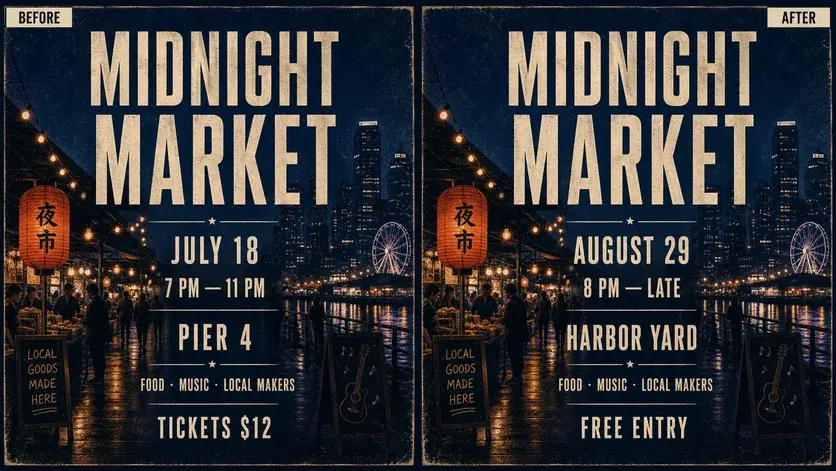
WHAT YOU CAN UPDATE
Use the finished image as context, make the requested copy change, then review the visual result before publishing.
Describe the intended wording and preserve the parts of the image that already work.
Describe the intended wording and preserve the parts of the image that already work.
Describe the intended wording and preserve the parts of the image that already work.
ABOUT THIS IMAGE EDIT
Dates are often baked into flattened posters, invitations, announcements, and social graphics. A chat-based edit lets you name the old date and the replacement while the image supplies visual context.
For reliable publishing, verify every digit, weekday, time, and time zone in the result. Avoid editing dates on official, financial, or evidentiary documents.
Open the image text editorHOW IT WORKS
The editor uses your image and instruction as context. You stay in the conversation until the result is ready.
Start with a JPG, PNG, or WebP poster, photo, menu, screenshot, product visual, or AI-generated graphic.
Say exactly what to replace, remove, or add—and explain what should stay visually unchanged.
Check the result, ask for follow-up changes in the same chat, then download the version you approve.
Review before publishing. Best for creative and promotional artwork—not official records, receipts, certificates, or evidence.
COMMON QUESTIONS
Yes. State the exact old and new date and explicitly ask to preserve the surrounding colors, imagery, spacing, and type style.
Yes. Upload the image in your mobile browser, describe the date change, and review the new version before downloading.
Confirm the year, weekday, time, time zone, venue, and any repeated date elsewhere in the image.
No. Do not alter IDs, receipts, financial records, certificates, or other official or evidentiary material.
MAKE THE EDIT
Open the editor here, upload your visual, and describe the exact result you want.