
Product mockups
Describe the intended wording and preserve the parts of the image that already work.
SCREENSHOT TEXT EDITOR
Revise UI labels, onboarding copy, or tutorial callouts in a screenshot without rebuilding the whole mockup.
Edit image textUpload a JPG, PNG, or WebP. Describe the exact text change.
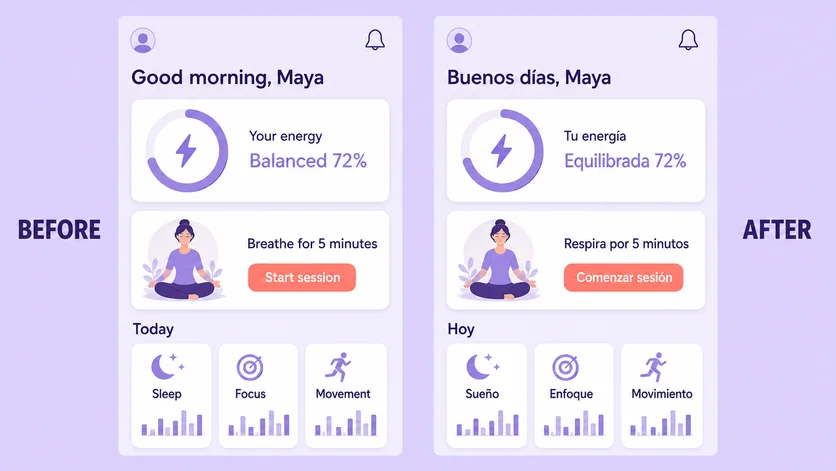
WHAT YOU CAN UPDATE
Use the finished image as context, make the requested copy change, then review the visual result before publishing.
Describe the intended wording and preserve the parts of the image that already work.
Describe the intended wording and preserve the parts of the image that already work.
Describe the intended wording and preserve the parts of the image that already work.
ABOUT THIS IMAGE EDIT
Screenshot editing is useful for product concepts, support articles, localization previews, and presentation mockups. Identify the interface area and quote the final text exactly.
Use only screenshots you are authorized to modify. Do not fabricate messages, transactions, account states, or other deceptive records.
Open the image text editorHOW IT WORKS
The editor uses your image and instruction as context. You stay in the conversation until the result is ready.
Start with a JPG, PNG, or WebP poster, photo, menu, screenshot, product visual, or AI-generated graphic.
Say exactly what to replace, remove, or add—and explain what should stay visually unchanged.
Check the result, ask for follow-up changes in the same chat, then download the version you approve.
Review before publishing. Use this workflow for authorized creative mockups—not fake messages, receipts, payment confirmations, or account evidence.
COMMON QUESTIONS
Yes. Name the control or screen area, quote the replacement, and ask to keep the interface geometry consistent.
Results vary. Use the highest-resolution screenshot available and inspect small labels at 100% zoom.
Yes, especially for visual previews. Confirm translated copy, truncation, and reading direction with your localization team.
No. Do not create deceptive conversations, transactions, receipts, or account records.
MAKE THE EDIT
Open the editor here, upload your visual, and describe the exact result you want.