
Environmental signs
Describe the intended wording and preserve the parts of the image that already work.
PHOTO TEXT EDITOR
Edit words that belong to the photographed scene—from storefront signs and labels to creative captions.
Edit image textUpload a JPG, PNG, or WebP. Describe the exact text change.
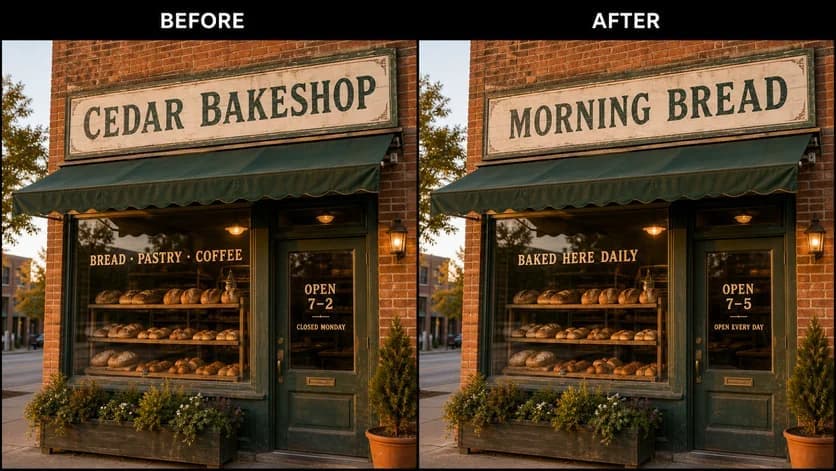
WHAT YOU CAN UPDATE
Use the finished image as context, make the requested copy change, then review the visual result before publishing.
Describe the intended wording and preserve the parts of the image that already work.
Describe the intended wording and preserve the parts of the image that already work.
Describe the intended wording and preserve the parts of the image that already work.
ABOUT THIS IMAGE EDIT
A photo text editor works on visible pixels rather than editable text layers. That makes it useful for signs, labels, displays, product concepts, and captions embedded in a finished photograph.
Natural scenes can be complex. Use a high-resolution source and review perspective, lighting, reflections, edges, and nearby objects after every edit.
Open the image text editorHOW IT WORKS
The editor uses your image and instruction as context. You stay in the conversation until the result is ready.
Start with a JPG, PNG, or WebP poster, photo, menu, screenshot, product visual, or AI-generated graphic.
Say exactly what to replace, remove, or add—and explain what should stay visually unchanged.
Check the result, ask for follow-up changes in the same chat, then download the version you approve.
Review before publishing. Only edit photos you own or have permission to use, and do not fabricate official or misleading evidence.
COMMON QUESTIONS
It is a workflow for changing visible words in a flattened photo by describing the desired result instead of selecting a text layer.
Yes. Provide the exact copy, approximate location, hierarchy, and a description of the intended visual style.
Clear, high-resolution images with a visible target area are easier to review than tiny, blurred, reflective, or heavily occluded text.
Yes. Upload, describe, review, and refine from a modern mobile browser.
MAKE THE EDIT
Open the editor here, upload your visual, and describe the exact result you want.