
Chalkboard signs
Describe the intended wording and preserve the parts of the image that already work.
HANDWRITTEN IMAGE TEXT
Explore revised wording for creative handwriting, chalkboards, notes, or signs while retaining the scene around it.
Edit image textUpload a JPG, PNG, or WebP. Describe the exact text change.
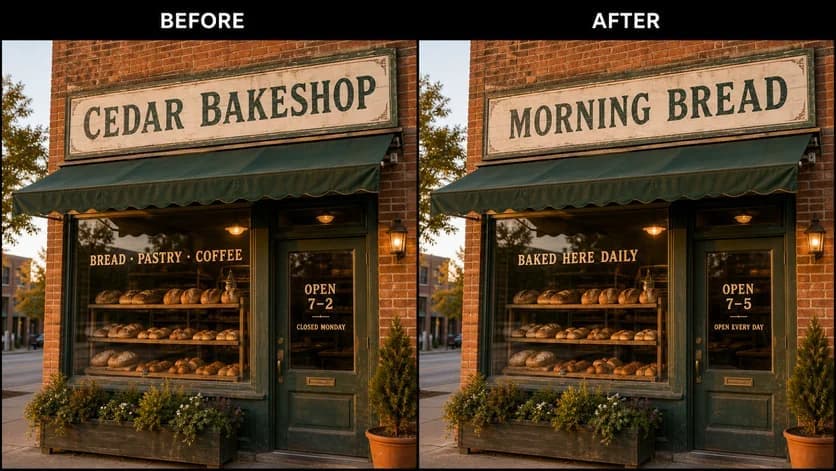
WHAT YOU CAN UPDATE
Use the finished image as context, make the requested copy change, then review the visual result before publishing.
Describe the intended wording and preserve the parts of the image that already work.
Describe the intended wording and preserve the parts of the image that already work.
Describe the intended wording and preserve the parts of the image that already work.
ABOUT THIS IMAGE EDIT
Handwriting is irregular by nature, so the goal is usually stylistic continuity rather than exact typeface matching. Describe the material—ink, chalk, paint, marker—and the intended wording.
Only modify handwriting you own or are authorized to adapt. Never use the workflow to imitate signatures, forge consent, or alter official records.
Open the image text editorHOW IT WORKS
The editor uses your image and instruction as context. You stay in the conversation until the result is ready.
Start with a JPG, PNG, or WebP poster, photo, menu, screenshot, product visual, or AI-generated graphic.
Say exactly what to replace, remove, or add—and explain what should stay visually unchanged.
Check the result, ask for follow-up changes in the same chat, then download the version you approve.
Review before publishing. Do not imitate signatures, create forged handwriting, or alter contracts, records, or evidence.
COMMON QUESTIONS
It can create a visually related replacement when the writing area is clear and the requested wording is concise.
Not reliably. The source provides style context, but irregular letterforms and textures can vary.
Name the surface, writing material, exact phrase, color, angle, and elements that must remain untouched.
No. Do not imitate signatures, forge consent, or alter handwritten official or evidentiary material.
MAKE THE EDIT
Open the editor here, upload your visual, and describe the exact result you want.