
Display ads
Describe the intended wording and preserve the parts of the image that already work.
BANNER AD TEXT EDITOR
Turn an approved creative into a refreshed offer or message without rebuilding the banner from scratch.
Edit image textUpload a JPG, PNG, or WebP. Describe the exact text change.
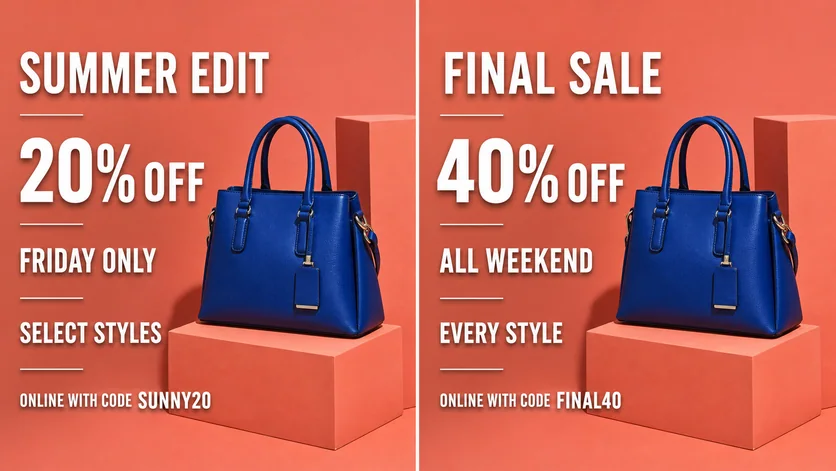
WHAT YOU CAN UPDATE
Use the finished image as context, make the requested copy change, then review the visual result before publishing.
Describe the intended wording and preserve the parts of the image that already work.
Describe the intended wording and preserve the parts of the image that already work.
Describe the intended wording and preserve the parts of the image that already work.
ABOUT THIS IMAGE EDIT
Campaign copy changes quickly. A focused edit can update an offer, date, headline, code, or call to action while retaining the original creative direction.
Advertising details must be accurate. Validate the offer, dates, terms, landing page, legal line, and brand approval before launch.
Open the image text editorHOW IT WORKS
The editor uses your image and instruction as context. You stay in the conversation until the result is ready.
Start with a JPG, PNG, or WebP poster, photo, menu, screenshot, product visual, or AI-generated graphic.
Say exactly what to replace, remove, or add—and explain what should stay visually unchanged.
Check the result, ask for follow-up changes in the same chat, then download the version you approve.
Review before publishing. Verify every offer, price, date, code, condition, and required disclosure before the ad goes live.
COMMON QUESTIONS
Yes. Provide the old and new offer wording and specify which visual elements must not change.
Yes. Quote the new CTA and ask to retain the button shape, contrast, and alignment.
This workflow edits the supplied image. Separate sizes may need individual layouts and review.
Confirm offer accuracy, dates, pricing, terms, disclosures, destination consistency, and brand compliance.
MAKE THE EDIT
Open the editor here, upload your visual, and describe the exact result you want.